DiyPhotoBits.com

A few bits and pieces about photography

DiyPhotoBits.com header image 4

Entries Tagged as 'Software'

DIYPhotobits.Com Camera Control 4.0 – Basic Bracketing

February 3rd, 2009 · 99 Comments

It is here, it is basic, but it works (somewhat) — Bracketing.  Once again I find myself either spending an hour I have available to work on the code, or publishing what I already have working, limited though it may be.

So here we have 4.0 – the Basic Bracketing version.

DOWNLOAD

Expect bugs — that’s why the version is a .0 one!  However it should do you for some basic HDR or timelapse uses.

Update:

  • Only works in P, A or S modes as the bracketing is controlled by adjusting the exposure compensation. I’ll do M mode support later.

[Read more →]

Tags: Software

DIYPhotobits.com Camera Control 3.1 – Patience

January 15th, 2009 · 17 Comments

Here is a small update to the 3.0 version

.  Besides a bug fix it also allows delaying the start of a time lapse, which is why I call this the Patience release.

DOWNLOAD

Changes:

  • Allow click on preview image if path has a space
  • Maximum time lapse shots
  • Delay before starting time lapse

When doing a time lapse you now get these options:

Frequency (seconds)

>

   Shots each time  

   Total shots to take  

   Delay before starting  

[Read more →]

Tags: Software

Closing a crashed DIYPhotobits.com Camera Control

January 7th, 2009 · 8 Comments

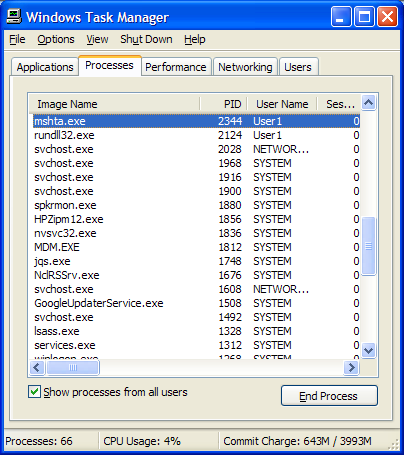
If you find that DIYPhotobits.com Camera Control crashes — then you may be suprised to find it does not appear in the Windows Task manager, so you can’t end the task as you might another application.

Well actually you can — but you need to know that it is actually an “HTA” which is a type of Internet Explorer script.  So to kill it you need to terminate a process called MSHTA.EXE which is the container for these scripts.

So press Alt-Ctrl-Del (or Windows-K) to bring up the Windows Task manager, click on the Processes tab, then find and click on mshta.exe.  You may then end click the End Process button.

[Read more →]

Tags: Software

DIYPhotobits.com Camera Control 3.0 – Happy New Year!

January 1st, 2009 · 17 Comments

I’m please to be able to say that you can now download

the latest release of DIYPhotobits.com Camera Control.   This is release 3.0 – the Happy New Year! release.

DOWNLOAD 3.0

Upgrading to this version will get you:

  • Time Lapse!  

Yes,  at last, I’ve implemented — admittedly very very basic and boring — but still functional — time lapse.  If you have a D300 or other camera with time lapse built in then this is boring, but for those of you with D40 and similiar then this gets you what you need to do all those fun time lapse videos.

[Read more →]

Tags: Software

Want Voice Activated Shutter Release for a Nikon?

December 28th, 2008 · No Comments

The software you need is:

  1. Microsoft Speech SDK 5.1
  2. DIYPhotobits.com Camera Control 2.1

Then to get voice activated shutter release:

  1. Install both.
  2. Turn on the Language Bar (in control panel, regional and language, languages, details, language bar)
  3. (Optional) Train Microsoft Voice recognition (in control panel, speech)
  4. Turn on the microphone (click the mic icon in the language bar)
  5. Run DIYPhotobits.com Camera Control 2.1
  6. Say “Voice command”
  7. (optional) Say “What can I say” then scroll down to the bottom of the list where it says “Menus and Buttons” and expand that list, ensure that “Shutter release” is one of the listed commands

[Read more →]

Tags: Software

What works and doesn’t work

December 10th, 2008 · 185 Comments

This is a summary of what Nikon DSLR models have been seen working, or not working, with the script.

DIYPhotobits Camera Control 2.1 – Greens (updated with feedback upto 5.2)
XP Vista / Win7
D300 Yes
Yes
Yes
D40 Yes Yes (vista home, raw works)

Yes (vista, raw ok)

D80 Yes No
Yes
D50 No
Yes
Yes

Yes

D200 / Fuji S5 Almost
Yes

Yes
Yes

Yes

Partial

Yes, Win7, jpg only

D60 Yes Yes
D70 / 70s – yes Yes Yes (win7 32bit) but no mode change

Yes (vista)

Yes (vista, jpg only)

[Read more →]

Tags: Software

DIYPhotobits.com Camera Control 2.1 – Greens

November 28th, 2008 · 64 Comments

UPDATE: Download latest here.


You know when you are a kid you have to eat your green vegetables before you are allowed to eat your chips (fries) and all that before you get dessert?  It is a sequence in life — first good-but-nasty, then ok stuff, and finally fun things you really want.

Well for programmers the sequence is:

  • Fix the bugs (Greens)
  • Implement obvious useful but boring features (Chips)
  • Add the fantastic new ideas you just had in the shower (Ice Cream)

So welcome to DIYPhotobits.com Camera Control 2.1 – the Greens release!

[Read more →]

Tags: Software

CC2: Oh what a lot of bugs!

November 3rd, 2008 · 19 Comments

Man I knew I shouldn’t have released this — Camera Control 2.0 is stuffed full of bugs.  None destructive, but they are bad enough to interfer with happy usage of the tool.  

Two are biggies:

First of all for those people getting the “Error: File already exists” error — that was also in 1.0 — and it is caused by using the Shutter Release button while the Start Tether button is down.  Just use one (Shutter Release with the “Download Immediately” ticked -or- use the Start Tether to do continuous tether) and it will be ok. 

[Read more →]

Tags: Software

DIYPhotobits.com Camera Control 2.0 : Embarrassment

October 29th, 2008 · 24 Comments

Update, try the

Camera Control 2.1 instead which fixes some bugs.

Ok so here is DIYPhotobits.com Camera Control 2.0 — the Embarrassment release.   I’ve named it that because I’ve had no time to work on it recently and so it still is a) very rough with major holes and b) fails to have all the obvious fixes and enhancements that I have discussed with people.

DOWNLOAD

Try instead 2.1 which fixes some bugs

[Read more →]

Tags: Software

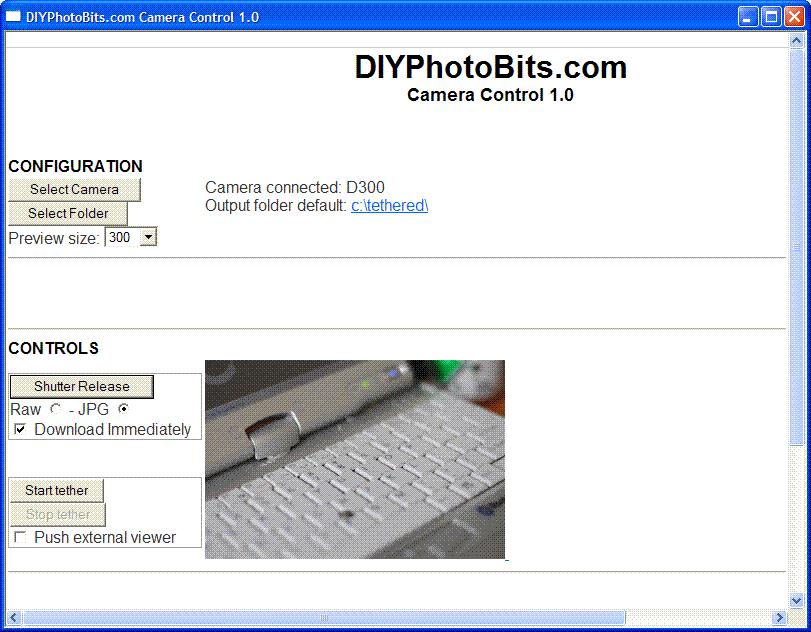
DIYPhotobits.com Camera Control 1.0

October 16th, 2008 · 22 Comments

Update; Now try version 2.

Ok here’s something new — I’ve taken the various little scripts for tethered shooting and remote control and wrapped them up in a nicer interface.  This is the first time I’ve tried writing a “hypertext application” or .HTA file and it’s quite an interesting mix of HTML and scripting.  I think I can do quite a few interesting things with this.  But for now here I have produced:

DIYPhotobits.com Camera Control 1.0

DOWNLOAD (200K installer)

 Use version 2 instead

[Read more →]

Tags: Software